
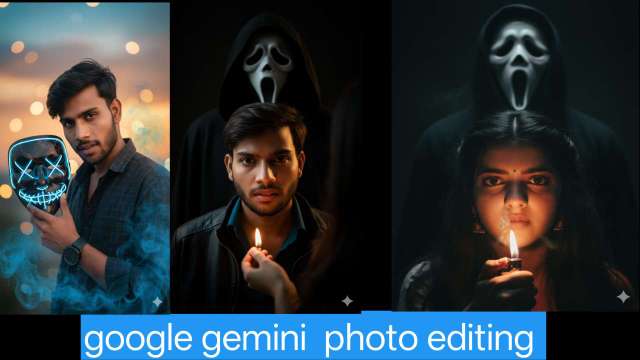
Create viral 3D mask photos with Google Gemini! Learn one-click AI photo editing tricks to make your Instagram DP stand out instantly.
google gemini mask tranding instgram dp photo editing just 1 click viral prompt
In today’s fast-paced digital world, photo editing has gone far beyond simple brightness adjustments or filter applications. The era of AI-powered creativity has arrived — and it’s changing the way we edit photos forever. With tools like Google Gemini 3D Photo Editing, users can now turn flat images into realistic, cinematic visuals that look straight out of a movie scene.
Whether you’re a content creator, YouTuber, or social media influencer, Gemini’s intelligent editing features let you craft eye-catching 3D-style photos in just one click. From enhancing depth and lighting to adding realistic effects, it helps your photos stand out and go viral on platforms like Instagram.
In this article, we’ll dive into what Google Gemini 3D Photo Editing is, how it works, its unique features, and how you can use it to create stunning viral DP photos that captivate your audience.
What is Google Gemini 3D Photo Editing?
Google Gemini is an advanced AI model developed by Google DeepMind, designed to understand text, images, videos, and more. Using this technology for photo editing allows users to create high-quality 3D effects with realistic depth, shadows, and cinematic lighting.Unlike traditional editing apps, Gemini uses AI prompts where you describe the style, effect, or transformation you want, and the system automatically generates stunning 3D visuals.
Why Google Gemini Is Perfect for viral Photo Editing
Here’s why Gemini is trending for Diwali 2025 photo edits:1. AI-Generated Glow Effects: Add diya lights, fireworks, and sparkler effects in seconds.2. Traditional Indian Themes: Sarees, kurtas, rangolis, and festive jewelry are easily added.3. Same Face Accuracy: Keep your exact face and expressions even after full AI transformation.4. High-Resolution Output: Perfect for websites, posters, or social media campaigns.5. Quick and Easy: No Photoshop or Lightroom skills needed — just type and generate.
ALL PROMPT ⤵️

1.prompt⤵️
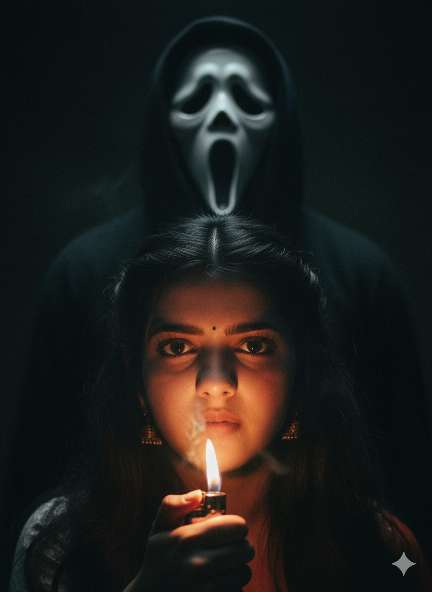
A tense, cinematic scene featuring a woman illuminated only by the flickering flame of a lighter she holds beneath his face. The soft orange glow reveals his focused eyes and the texture of her skin against a backdrop of near-total darkness. Behind her, barely visible in the shadows, stands a hooded figure wearing a ghostly white mask with a wide, haunting scream-like expression. The composition captures the exact moment before fear sets in — suspense thick in the air, light and shadow creating a chilling atmosphere. The mood feels intimate, claustrophobic, and cinematic, like a frame from a psychological horror film.
prompt⤵️
A tense, cinematic scene featuring a woman illuminated only by the flickering flame of a lighter she holds beneath his face. The soft orange glow reveals his focused eyes and the texture of her skin against a backdrop of near-total darkness. Behind her, barely visible in the shadows, stands a hooded figure wearing a ghostly white mask with a wide, haunting scream-like expression. The composition captures the exact moment before fear sets in — suspense thick in the air, light and shadow creating a chilling atmosphere. The mood feels intimate, claustrophobic, and cinematic, like a frame from a psychological horror film.

prompt⤵️
A hyper-realistic cinematic portrait of a young man with perfectly styled black hair and a well-groomed beard, holding a cracked neon LED mask with glowing blue “X” eyes and a stitched smile near his face. The man’s expression is intense and confident, looking directly into the camera. He is wearing a dark checkered shirt and a black wristwatch. Blue smoke surrounds him, creating a mysterious cyberpunk vibe. The background shows a soft sunset sky with orange and blue tones, with beautiful bokeh lighting. Ultra-detailed, DSLR-quality, realistic lighting, 8K clarity. The man’s face must match exactly and remain 100% consistent with the original reference photo.
Key Features of Google Gemini 3D Photo Editing
Realistic 3D Depth – Add layers, shadows, and highlights to make photos look three-dimensional.Cinematic Effects – Create professional movie-like scenes with lighting and contrast.AI-Powered Prompts – No need for manual editing; just type what you want.Custom Backgrounds – Replace or enhance backgrounds with high-resolution 3D visuals.Easy for Beginners – Even without editing skills, anyone can create professional results.
How to Use Google Gemini for 3D Photo Editing
Viral Content Creation – Eye-catching 3D photos get more likes, shares, and engagement.Professional Look – Great for YouTube thumbnails, posters, and digital marketing.Time-Saving – No need for complex tools like Photoshop; Gemini does the job in seconds.Free or Low-Cost – Many features are available without expensive subscriptions.
Conclusion
Google Gemini 3D Photo Editing is a game-changer for digital creators. With AI-powered tools, anyone can create cinematic, professional, and realistic 3D images without needing advanced editing skills. Whether you want to design viral social media posts, eye-catching YouTube thumbnails, or creative digital art, Gemini makes the process simple and powerful.The future of photo editing is here, and it’s 3D – powered by Google Gemini!