
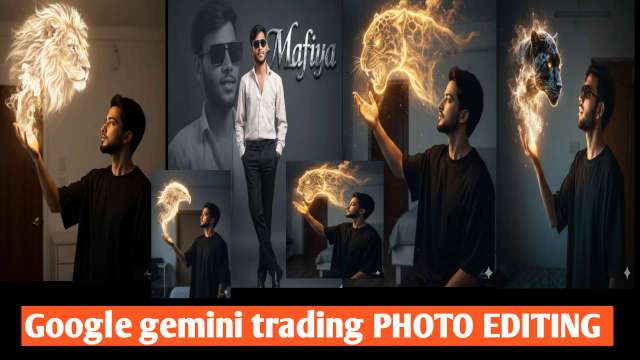
In today’s digital era, photo editing is no longer just about adjusting brightness or adding filters. With the rise of AI-powered tools, 3D photo editing has become a trend, giving images a lifelike and cinematic touch. One such powerful innovation is Google Gemini 3D Photo Editing. Whether you are a content creator, YouTuber, or social media influencer, this tool helps you transform ordinary images into professional 3D-style masterpieces.In this blog, we will explore what Google Gemini 3D Photo Editing is, how it works, its features, and how you can use it to create viral content.
What is Google Gemini 3D Photo Editing?
Google Gemini is an advanced AI model developed by Google DeepMind, designed to understand text, images, videos, and more. Using this technology for photo editing allows users to create high-quality 3D effects with realistic depth, shadows, and cinematic lighting.Unlike traditional editing apps, Gemini uses AI prompts where you describe the style, effect, or transformation you want, and the system automatically generates stunning 3D visuals.
ALL PROMPT ⤵️
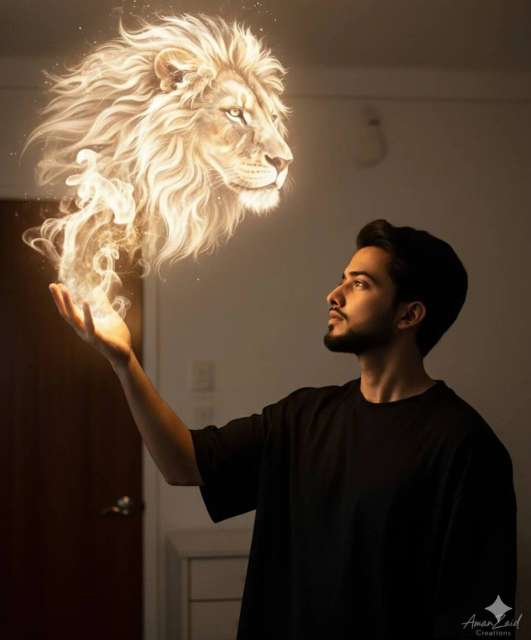
prompt⤵️
A young man (face and hair should be 100% based on the attached photo). His expression conveys admiration, focus, and perhaps a touch of reverence.Pose: Shown in profile, looking upward and to the left toward a luminous figure. He extends his left hand, which becomes the apparent source of magic. The pose emphasizes the interaction between him and the magical creature.Environment:A simple bedroom with light-colored walls, a wooden door, and minimal clean-styled furniture.Image Structure and AngleFraming: Medium-close portrait, vertical orientation, capturing the model from chest up, leaving space above for the magical effect to unfoldAngle: The camera is at or slightly below the model’s face level, creating a natural, immersive, and intimate perspective.Composition: The visual balance is a”conversation” between the subject and the creature. The subject occupies the lower right third of the frame, while the luminous creature dominates the upper left third, forming a diagonal harmony.The primary element is a stream of smoke and light emanating from his hand, transforming into the head of an animal (the animal should be chosen based on which fits the model best-could be reptile, loin, marine life, or mammal, large or small).ClothingThe model wears a very loose oversized black T-shirt. Dark clothing contrasts against the background and emphasizes the warm light illuminating his face.Lighting and Color AnalysisLight and Shadow: The main dramatic light source is diegetic, appearing to originate from within the scene-the magic he conjures. This warm, radiant light (yellow/white strongly illuminates the side of his face and shoulder, casting deep shadows across his body and the room.Color Temperature: Strong contrast: warm golden/orange magical light versus a cool, desaturated environment with bluish shadows.Saturation: High saturation in the glowing magical areas; the rest is desaturated to maintain focus on the light effect and expression.Exposure: Exposure is tuned to the highlights-his face and the luminous smoke-creature-plunging the rest of the environment into shadow, creating a cinematic low-key look. Small glowing dust particles of “magic” add texture to the darkness.Camera and Style Parameters(Estimated)Lens: Portrait lens (50mm or 85mm) with wide aperture (f/1.8-f/2.0), producing shallow depth of field and soft background blur.ISO: Moderate (400-800), cleaned in post-production for a smooth, noise-free finish.Style: Hyper-realistic photo with elements of dark fantasy or magical realism. The main technique is photocomposition to integrate glowing light, smoke effects, and the spiritual animal tormCreate the unac no theDo not change or edit my face.
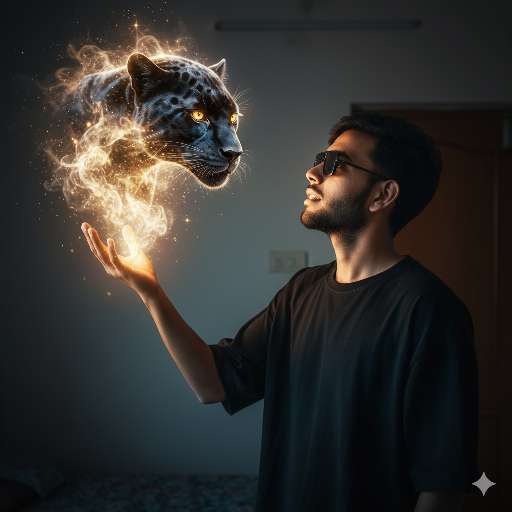
Prompt ⤵️
A young man (face and hair should be 100% based on the attached photo). His expression conveys admiration, focus, and perhaps a touch of reverence.
Pose: Shown in profile, looking upward and to the left toward a luminous figure. He extends his left hand, which becomes the apparent source of magic. The pose emphasizes the interaction between him and the magical creature.
Environment:
A simple bedroom with light-colored walls, a wooden door, and minimal clean-styled furniture.
Image Structure and Angle
Framing: Medium-close portrait, vertical orientation, capturing the model from chest up, leaving space above for the magical effect to unfold
Angle: The camera is at or slightly below the model’s face level, creating a natural, immersive, and intimate perspective.
Composition: The visual balance is a
“conversation” between the subject and the creature. The subject occupies the lower right third of the frame, while the luminous creature dominates the upper left third, forming a diagonal harmony.
The primary element is a stream of smoke and light emanating from his hand, transforming into the head of an animal (the animal should be chosen based on which fits the model best-could be reptile, panther, marine life, or mammal, large or small).
Clothing
The model wears a very loose oversized black T-shirt. Dark clothing contrasts against the background and emphasizes the warm light illuminating his face.
Lighting and Color Analysis
Light and Shadow: The main dramatic light source is diegetic, appearing to originate from within the scene-the magic he conjures. This warm, radiant light (yellow/white strongly illuminates the side of his face and shoulder, casting deep shadows across his body and the room.
Color Temperature: Strong contrast: warm golden/orange magical light versus a cool, desaturated environment with bluish shadows.
Saturation: High saturation in the glowing magical areas; the rest is desaturated to maintain focus on the light effect and expression.
Exposure: Exposure is tuned to the highlights-his face and the luminous smoke-creature-plunging the rest of the environment into shadow, creating a cinematic low-key look. Small glowing dust particles of “magic” add texture to the darkness.
Camera and Style Parameters
(Estimated)
Lens: Portrait lens (50mm or 85mm) with wide aperture (f/1.8-f/2.0), producing shallow depth of field and soft background blur.
ISO: Moderate (400-800), cleaned in post-production for a smooth, noise-free finish.
Style: Hyper-realistic photo with elements of dark fantasy or magical realism. The main technique is photocomposition to integrate glowing light, smoke effects, and the spiritual animal torm
Create the unac no the
Do not change or edit my face.
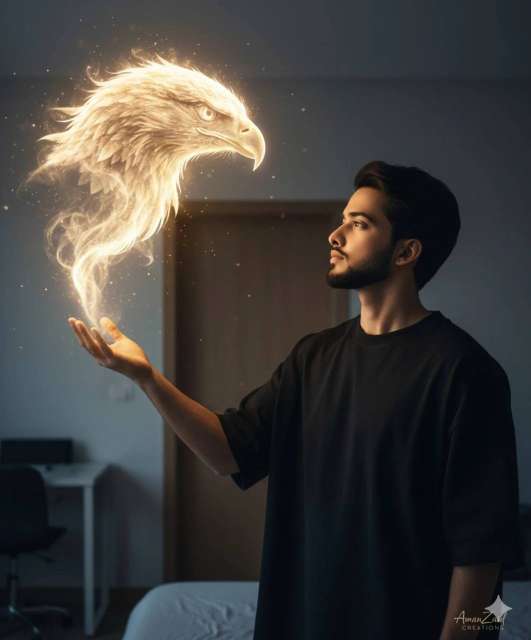
PROMPT ⤵️
A young man (face and hair should be 100% based on the attached photo). His expression conveys admiration, focus, and perhaps a touch of reverence.Pose: Shown in profile, looking upward and to the left toward a luminous figure. He extends his left hand, which becomes the apparent source of magic. The pose emphasizes the interaction between him and the magical creature.Environment:A simple bedroom with light-colored walls, a wooden door, and minimal clean-styled furniture.Image Structure and AngleFraming: Medium-close portrait, vertical orientation, capturing the model from chest up, leaving space above for the magical effect to unfoldAngle: The camera is at or slightly below the model’s face level, creating a natural, immersive, and intimate perspective.Composition: The visual balance is a“conversation” between the subject and the creature. The subject occupies the lower right third of the frame, while the luminous creature dominates the upper left third, forming a diagonal harmony.The primary element is a stream of smoke and light emanating from his hand, transforming into the head of an animal (the animal should be chosen based on which fits the model best-could be reptile, bird, marine life, or mammal, large or small).ClothingThe model wears a very loose oversized black T-shirt. Dark clothing contrasts against the background and emphasizes the warm light illuminating his face.Lighting and Color AnalysisLight and Shadow: The main dramatic light source is diegetic, appearing to originate from within the scene-the magic he conjures. This warm, radiant light (yellow/white strongly illuminates the side of his face and shoulder, casting deep shadows across his body and the room.Color Temperature: Strong contrast: warm golden/orange magical light versus a cool, desaturated environment with bluish shadows.Saturation: High saturation in the glowing magical areas; the rest is desaturated to maintain focus on the light effect and expression.Exposure: Exposure is tuned to the highlights-his face and the luminous smoke-creature-plunging the rest of the environment into shadow, creating a cinematic low-key look. Small glowing dust particles of “magic” add texture to the darkness.Camera and Style Parameters(Estimated)Lens: Portrait lens (50mm or 85mm) with wide aperture (f/1.8-f/2.0), producing shallow depth of field and soft background blur.ISO: Moderate (400-800), cleaned in post-production for a smooth, noise-free finish.Style: Hyper-realistic photo with elements of dark fantasy or magical realism. The main technique is photocomposition to integrate glowing light, smoke effects, and the spiritual animal tormCreate the unac no theDo not change or edit my face.
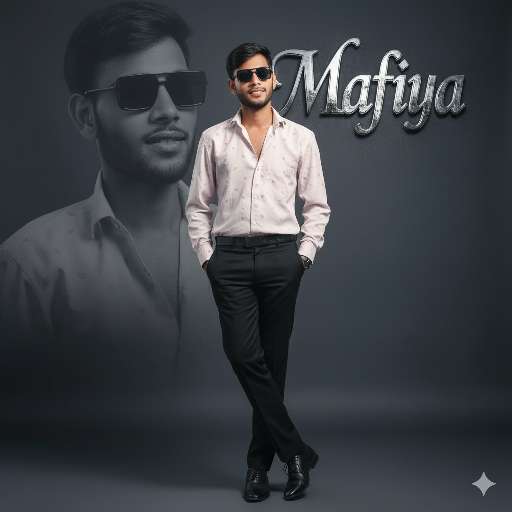
PROMPT ⤵️
A stylish young man wearing a same in a photo, standing confidently with hands in pockets, one leg crossed over the other, wearing black formal shoes, studio portrait with soft lighting, elegant dark background, cinematic look, professional photo editing, a large faded background portrait of the same person in black sunglasses behind him, luxury fashion style, premium magazine photoshoot vibe.” Same face as the uploaded imageAnd add a metallic text in background Mafiya
Key Features of Google Gemini 3D Photo Editing
Realistic 3D Depth – Add layers, shadows, and highlights to make photos look three-dimensional.Cinematic Effects – Create professional movie-like scenes with lighting and contrast.AI-Powered Prompts – No need for manual editing; just type what you want.Custom Backgrounds – Replace or enhance backgrounds with high-resolution 3D visuals.Easy for Beginners – Even without editing skills, anyone can create professional results.
How to Use Google Gemini for 3D Photo Editing
Here’s a simple step-by-step guide:Access Google Gemini – Open Gemini through Google AI tools or apps that support Gemini integration.Upload Your Photo – Choose a high-resolution image for best results.Write a Prompt – For example:“Create a 3D cinematic portrait of a boy wearing a black jacket, glowing neon background, with depth and shadows.”Generate & Edit – Gemini will process your request and give multiple 3D-style outputs.Save & Share – Download the best result and share it on social media or use it for professional projects
Benefits of Using Google Gemini 3D Editing
Viral Content Creation – Eye-catching 3D photos get more likes, shares, and engagement.Professional Look – Great for YouTube thumbnails, posters, and digital marketing.Time-Saving – No need for complex tools like Photoshop; Gemini does the job in seconds.Free or Low-Cost – Many features are available without expensive subscriptions.
Conclusion
Google Gemini 3D Photo Editing is a game-changer for digital creators. With AI-powered tools, anyone can create cinematic, professional, and realistic 3D images without needing advanced editing skills. Whether you want to design viral social media posts, eye-catching YouTube thumbnails, or creative digital art, Gemini makes the process simple and powerful.The future of photo editing is here, and it’s 3D – powered by Google Gemini!
ABOUT ME
Rgedit.in, and my real name is Manav . I’m a social media influencer and a full-time YouTuber with over 30k subscribers. or 500k followers in instagram I create content about photo editing, reel video editing, and CapCut templates, and bing image creating prompts,which I share on my Instagrams
thanks for visit my website