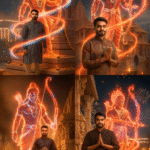

Transform your photos into Viral masterpieces with Google Gemini’s New Trend Style Editing! In just one click, you can create stunning 3D-style, cinematic, and AI-enhanced images that grab attention on Instagram, YouTube, and every social media platform. Whether you’re a content creator, influencer, or beginner, this latest Gemini viral prompt will help you edit like a pro and make your photos shine this season. 🌟
In today’s digital era, photo editing is no longer just about adjusting brightness or adding filters. With the rise of AI-powered tools, 3D photo editing has become a trend, giving images a lifelike and cinematic touch. One such powerful innovation is Google Gemini 3D Photo Editing. Whether you are a content creator, YouTuber, or social media influencer, this tool helps you transform ordinary images into professional 3D-style masterpieces.In this blog, we will explore what Google Gemini 3D Photo Editing is, how it works, its features, and how you can use it to create viral content.
What is Google Gemini 3D Photo Editing?
Google Gemini is an advanced AI model developed by Google DeepMind, designed to understand text, images, videos, and more. Using this technology for photo editing allows users to create high-quality 3D effects with realistic depth, shadows, and cinematic lighting.Unlike traditional editing apps, Gemini uses AI prompts where you describe the style, effect, or transformation you want, and the system automatically generates stunning 3D visuals.
Key Features of Google Gemini 3D Photo Editing
Realistic 3D Depth – Add layers, shadows, and highlights to make photos look three-dimensional.Cinematic Effects – Create professional movie-like scenes with lighting and contrast.AI-Powered Prompts – No need for manual editing; just type what you want.Custom Backgrounds – Replace or enhance backgrounds with high-resolution 3D visuals.Easy for Beginners – Even without editing skills, anyone can create professional results.
ALL PROMPT

PROMPT
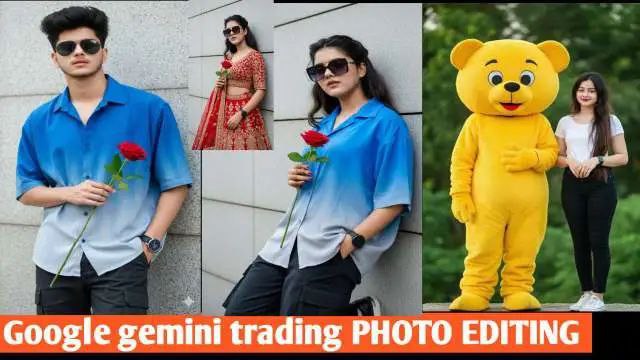
Ultra-realistic portrait of the same girl from the reference photo, with identical face, expression, hairstyle, and lighting. She is standing confidently against a modern textured wall, holding a single red rose in one hand. She is wearing a stunning traditional red lehenga choli with intricate golden embroidery and matching dupatta flowing softly. The scene keeps a cinematic, natural daylight tone with soft shadows, stylish composition, and realistic textures. Her sunglasses remain the same, makeup soft and elegant, background clean and minimalistic for a classy look

PROMPT
Stylish young man (use my real face with 100% accuracy), with dark, messy hair and sunglasses, leaning casually against a light gray, paneled wall. He is wearing an oversized, short-sleeved button-up shirt that transitions from bright blue to light gray in an ombre effect, and dark cargo pants. Right hand holding a rose, left hand in pocket, looking directly at the camera. He has a dark watch on his left wrist. Lighting is bright and even, highlighting textures. 8Kultra-realistic, high detail, cinematic.

PROMPT
Change into the background with natural green smoothies blured” Street photography capturing and white shirt, dark black jeans white sneakers shoes next to a bright yellow 6 feet teddy bear mascot, photo poss.

PROMPT
Stylish young girl (use my real face with 100% accuracy), with dark, messy hair and sunglasses, leaning casually against a light gray, paneled wall. He is wearing an oversized, short-sleeved button-up shirt that transitions from bright blue to light gray in an ombre effect, and dark cargo pants. Right hand holding a rose, left hand in pocket, looking directly at the camera. He has a dark watch on his left wrist. Lighting is bright and even, highlighting textures. 8Kultra-realistic, high detail, cinematic
Key Features of Google Gemini 3D Photo Editing
Realistic 3D Depth – Add layers, shadows, and highlights to make photos look three-dimensional.Cinematic Effects – Create professional movie-like scenes with lighting and contrast.AI-Powered Prompts – No need for manual editing; just type what you want.Custom Backgrounds – Replace or enhance backgrounds with high-resolution 3D visuals.Easy for Beginners – Even without editing skills, anyone can create professional results.
How to Use Google Gemini for 3D Photo Editing
Viral Content Creation – Eye-catching 3D photos get more likes, shares, and engagement.Professional Look – Great for YouTube thumbnails, posters, and digital marketing.Time-Saving – No need for complex tools like Photoshop; Gemini does the job in seconds.Free or Low-Cost – Many features are available without expensive subscriptions.
Conclusion
Google Gemini 3D Photo Editing is a game-changer for digital creators. With AI-powered tools, anyone can create cinematic, professional, and realistic 3D images without needing advanced editing skills. Whether you want to design viral social media posts, eye-catching YouTube thumbnails, or creative digital art, Gemini makes the process simple and powerful.The future of photo editing is here, and it’s 3D – powered by Google Gemini!
ABOUT ME
Rgedit.in, and my real name is Manav . I’m a social media influencer and a full-time YouTuber with over 30k subscribers. or 500k followers in instagram I create content about photo editing, reel video editing, and CapCut templates, and bing image creating prompts,which I share on my Instagrams
thanks for visit my website